顯示具有 sql 標籤的文章。 顯示所有文章

2014年1月22日 星期三

Stored Procedures for Java Programmers

Functions

Stored procedures can return values, so the CallableStatement class has methods like getResultSetto retrieve return values. When a procedure returns a value, you must tell the JDBC driver what SQL type the value will be, with the registerOutParameter method. You must also change the procedure call specification to indicate that the procedure returns a value.


Here's a follow on from our earlier example. This time we're asking how old Dylan Thomas was when he passed away. This time, the stored procedure is in PostgreSQL's pl/pgsql:
create function snuffed_it_when (VARCHAR) returns integer '
declare
    poet_id NUMBER;
    poet_age NUMBER;
begin
    -- first get the id associated with the poet.
    SELECT id INTO poet_id FROM poets WHERE name = $1;
    -- get and return the age.
    SELECT age INTO poet_age FROM deaths WHERE mort_id = poet_id;
    return age;
end;
' language 'pl/pgsql';
As an aside, note that the pl/pgsql parameter names are referred to by the $n syntax used in Unix and DOS scripts. Also note the embedded comments; this is another advantage over Java. Writing such comments in Java is possible, of course, but they often look messy and disjointed from the SQL text, which has to be embedded in Java Strings.
Here's the Java code to call the procedure:
connection.setAutoCommit(false);
CallableStatement proc =
    connection.prepareCall("{ ? = call snuffed_it_when(?) }");
proc.registerOutParameter(1, Types.INTEGER);
proc.setString(2, poetName);
cs.execute();
int age = proc.getInt(2);
Related Reading
What happens if you specify the return type incorrectly? Well, you get a RuntimeException when the procedure is called, just as you do when you use a wrong type method in a ResultSetoperation.

Complex Return Values

Many people's knowledge of stored procedures seems to end with what we've discussed. If that's all there was to stored procedures, they wouldn't be a viable replacement for other remote execution mechanisms. Stored procedures are much more powerful.
When you execute a SQL query, the DBMS creates a database object called a cursor, which is used to iterate over each row returned from a query. A ResultSet is a representation of a cursor at a point in time. That's why, without buffering or specific database support, you can only go forward through a ResultSet.
Some DBMSs allow you to return a reference to a cursor from a stored procedure call. JDBC does not support this, but the JDBC drivers from Oracle, PostgreSQL, and DB2 all support turning the pointer to the cursor into a ResultSet.
Consider listing all of the poets who never made it to retirement age. Here's a procedure that does that and returns the open cursor, again in PostgreSQL's pl/pgsql language:
create procedure list_early_deaths () return refcursor as '
declare
    toesup refcursor;
begin
    open toesup for
        SELECT poets.name, deaths.age
        FROM poets, deaths
        -- all entries in deaths are for poets.
        -- but the table might become generic.
        WHERE poets.id = deaths.mort_id
            AND deaths.age < 60;
    return toesup;
end;
' language 'plpgsql';
Here's a Java method that calls the procedure and outputs the rows to a PrintWriter:
static void sendEarlyDeaths(PrintWriter out)
{
    Connection con = null;
    CallableStatement toesUp = null;
    try
    {
        con = ConnectionPool.getConnection();

        // PostgreSQL needs a transaction to do this...
        con.setAutoCommit(false);

        // Setup the call.
        CallableStatement toesUp
            = connection.prepareCall("{ ? = call list_early_deaths () }");
        toesUp.registerOutParameter(1, Types.OTHER);
        getResults.execute();

        ResultSet rs = (ResultSet) getResults.getObject(1);
        while (rs.next())
        {
            String name = rs.getString(1);
            int age = rs.getInt(2);
            out.println(name + " was " + age + " years old.");
        }
        rs.close();
    }
    catch (SQLException e)
    {
        // We should protect these calls.
        toesUp.close();
        con.close();
    }
}
Because returning cursors from procedures is not directly supported by JDBC, we use Types.OTHER to declare the return type of the procedure and then cast from the call to getObject().
The Java method that calls the procedure is a good example of mapping. Mapping is a way of abstracting the operations on a set. Instead of returning the set from this procedure, we can pass in the operation to perform. In this case, the operation is to print the ResultSet to an output stream. This is such a common example it was worth illustrating, but here's another Java method that calls the same procedure:
public class ProcessPoetDeaths
{
    public abstract void sendDeath(String name, int age);
}

static void mapEarlyDeaths(ProcessPoetDeaths mapper)
{
    Connection con = null;
    CallableStatement toesUp = null;
    try
    {
        con = ConnectionPool.getConnection();
        con.setAutoCommit(false);

        CallableStatement toesUp
            = connection.prepareCall("{ ? = call list_early_deaths () }");
        toesUp.registerOutParameter(1, Types.OTHER);
        getResults.execute();

        ResultSet rs = (ResultSet) getResults.getObject(1);
        while (rs.next())
        {
            String name = rs.getString(1);
            int age = rs.getInt(2);
            mapper.sendDeath(name, age);
        }
        rs.close();
    }
    catch (SQLException e)
    {
        // We should protect these calls.
        toesUp.close();
        con.close();
    }
}
This allows arbitrary operations to be performed on the ResultSet data without having to change or duplicate the method that gets the ResultSet! If we want we can rewrite the sendEarlyDeaths method:
static void sendEarlyDeaths(final PrintWriter out)
{
    ProcessPoetDeaths myMapper = new ProcessPoetDeaths()
    {
        public void sendDeath(String name, int age)
        {
            out.println(name + " was " + age + " years old.");
        }
    };
    mapEarlyDeaths(myMapper);
}
This method calls mapEarlyDeaths with an anonymous instance of the class ProcessPoetDeaths. This class instance has an implementation of the sendDeath method, which writes to the output stream in the same way as our previous example. Of course, this technique isn't specific to stored procedures, but combined with stored procedures that return ResultSets, it is a powerful tool.

2011年9月25日 星期日

UNION vs DISTINCT

Select Distinct is used to select distinct Combination of Cols , normally used with a JOIN.
UNION just Joins and gets distinct rows from two sets which have eaqul number of columns. So clearly you cannot apply one instead of other.

UNION ALL and UNION are discusses in terms of performance. UNION ALL is better as it does not depuplicates.


程式碼工作室
ERP/EIP/CMS/CHART/REPORT/SPC/EDA/雲端 系統開發整合
ASP/PHP/JSP/ASP.NET 網頁設計
技術指導顧問
信箱:paulwu0114@gmail.com
http://www.coding.com.tw

2011年7月26日 星期二

在SSIS中使用Web Service任务进行集成

SSIS是SQL Server 2005新增的一个服务,全称是SQL Server Integration Service。中文一般翻译为:集成服务或者整合服务。
SSIS在整个SQL Server的BI 平台中的定位是ETL解决方案,它的前身是SQL Server 2000的DTS(Data Transfomation Service),但较之DTS,有了很大的改变和增强:它是完全基于.NET编写的,并且提供了完整的服务、运行引擎、异常处理、跟踪日志、扩展机制等等。
有关SSIS的完整内容,如果有兴趣,应该参考有关的书籍,或者参加有关的培训学习。
本文主要讲解一下,如何在SSIS中使用Web Service,这是我经常被问到的问题:因为在做数据集成的时候,数据源系统可能没有办法让我们直接访问数据库。但是他们可以公开一些服务,这样我们就可以通过访问这些Web Service对其进行读取和整合。
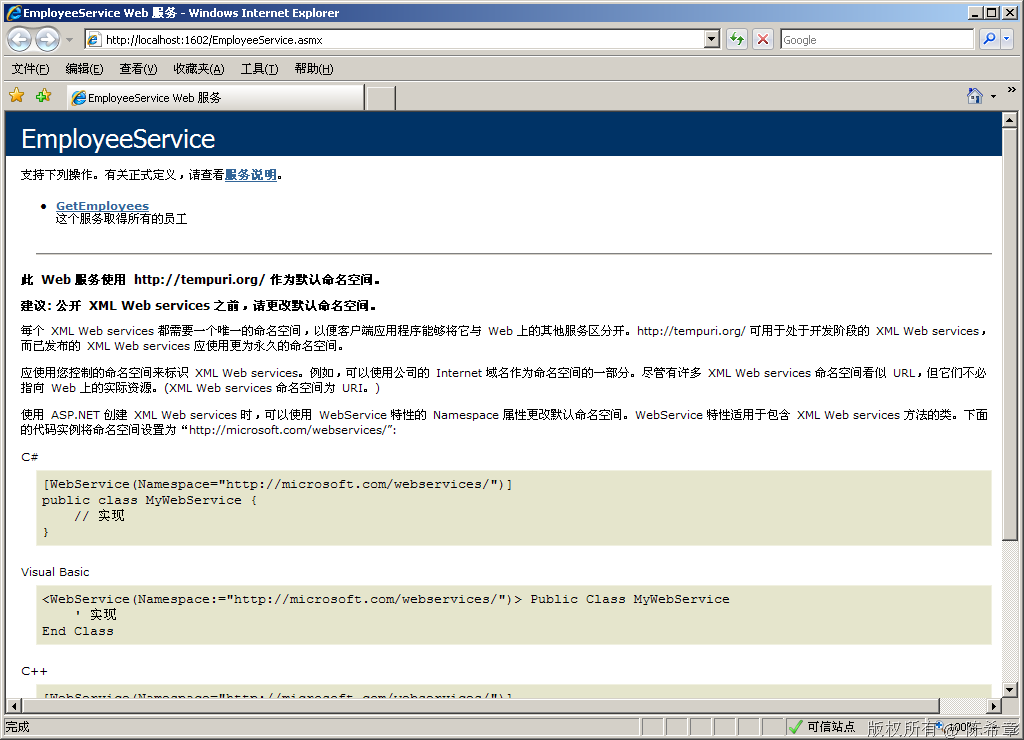
1. 作为演示目的,我写了一个很简单的服务。模拟的是人事系统,它通过Web Service的方式将最新的员工信息发布出来。
image
点击”GetEmployees” 链接
image
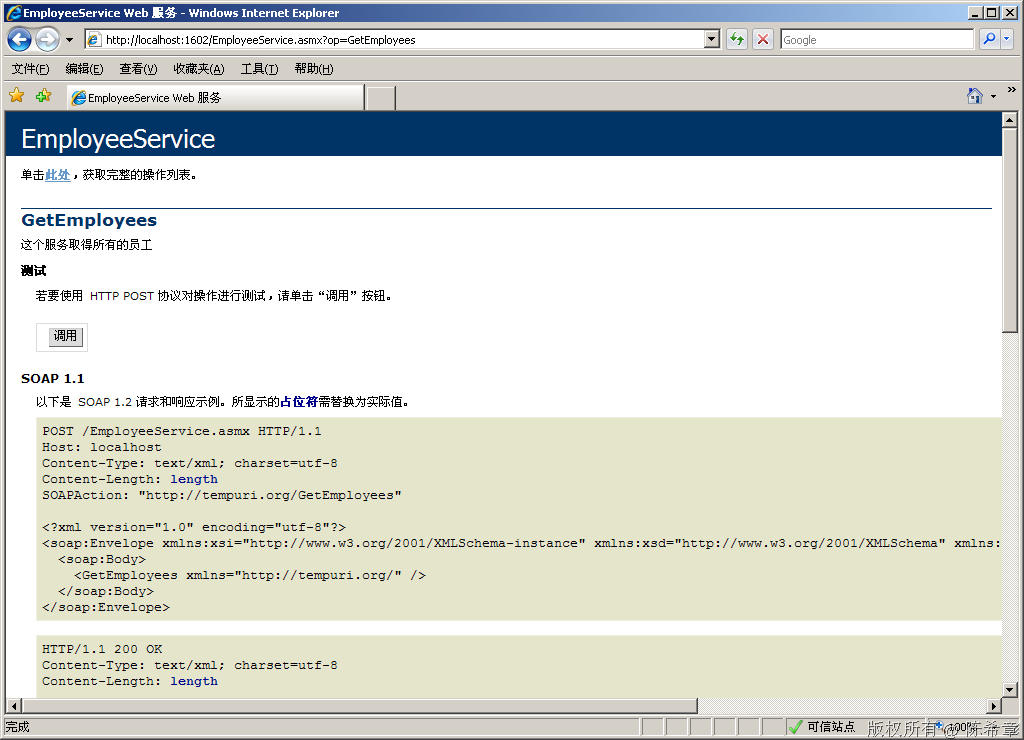
点击“调用”按钮
image
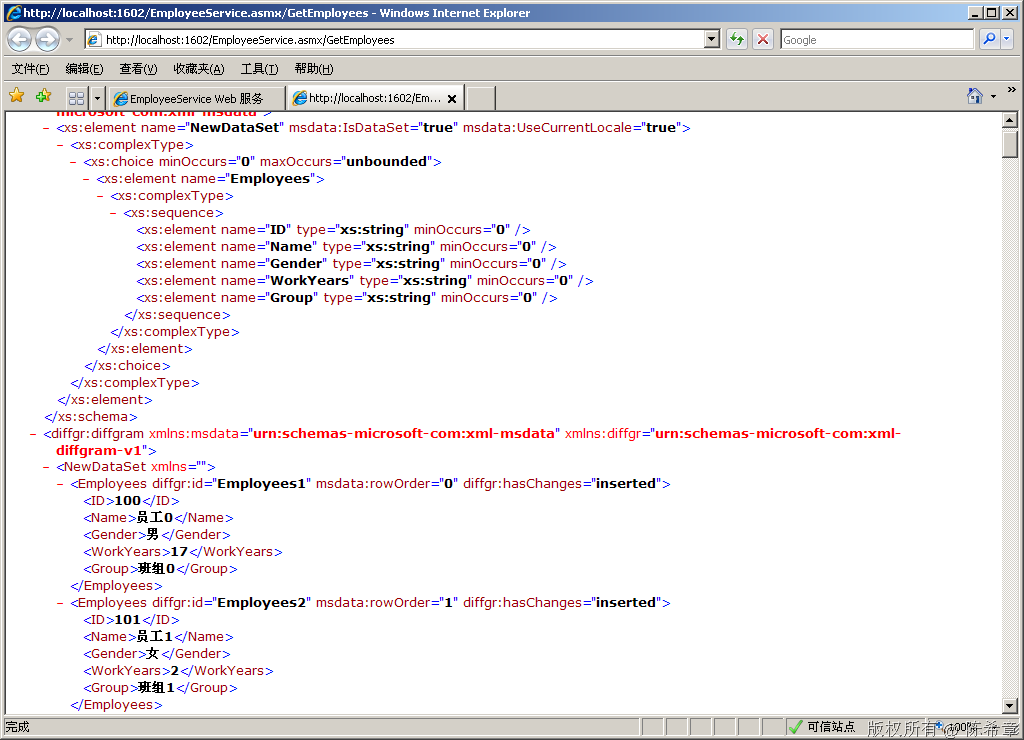
我这里只是简单地随机产生了100个员工,包括了ID,Name,Gender,WorkYears,Groups等信息
这个服务的代码如下
using System;
using System.Web.Services;
using System.Data;

namespace HRService
{
    /// <summary>
    /// 这个服务模拟了一个人事系统,它将最新的员工列表发布出来
    /// 作者:陈希章
    /// </summary>
    [WebService(Namespace = "http://tempuri.org/")]
    [WebServiceBinding(ConformsTo = WsiProfiles.BasicProfile1_1)]
    [System.ComponentModel.ToolboxItem(false)]
    public class EmployeeService : System.Web.Services.WebService
    {
        [WebMethod(
            Description="这个服务取得所有的员工")]
        public DataSet GetEmployees()
        {
            DataSet ds = new DataSet();
            DataTable tb = new DataTable("Employees");

            tb.Columns.Add("ID");
            tb.Columns.Add("Name");
            tb.Columns.Add("Gender");
            tb.Columns.Add("WorkYears");
            tb.Columns.Add("Group");

            Random rnd=new Random();
            for (int i = 0; i < 100; i++)
            {
                DataRow row = tb.NewRow();
                row[0] = i+100;
                row[1] = "员工" + i.ToString();
                row[2] = i % 5 == 0 ? "男" : "女";
                row[3] = rnd.Next(20);
                row[4] = "班组" + i % 9;

                tb.Rows.Add(row);
            }
            ds.Tables.Add(tb);

            return ds;
        }
    }
}

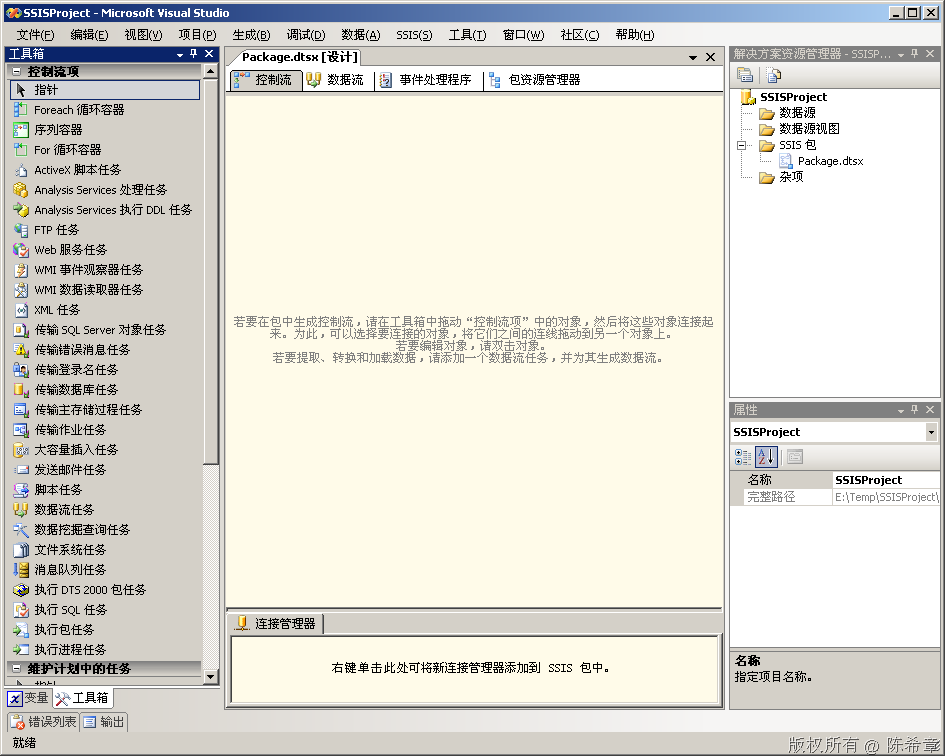
2. 创建一个SSIS包,准备使用Web Service任务项去调用该服务
image
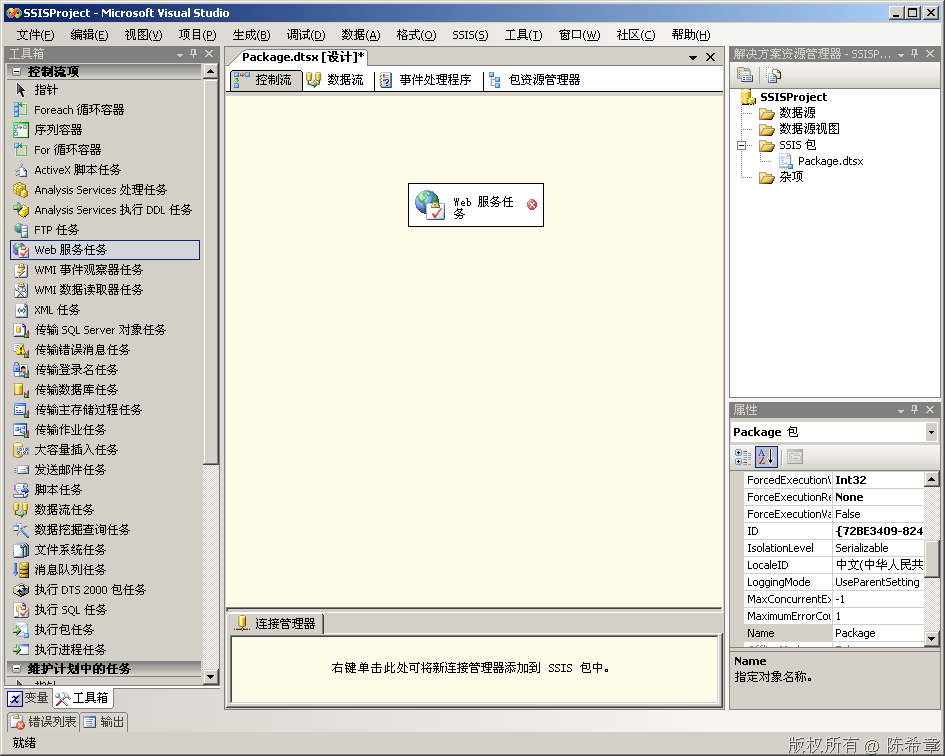
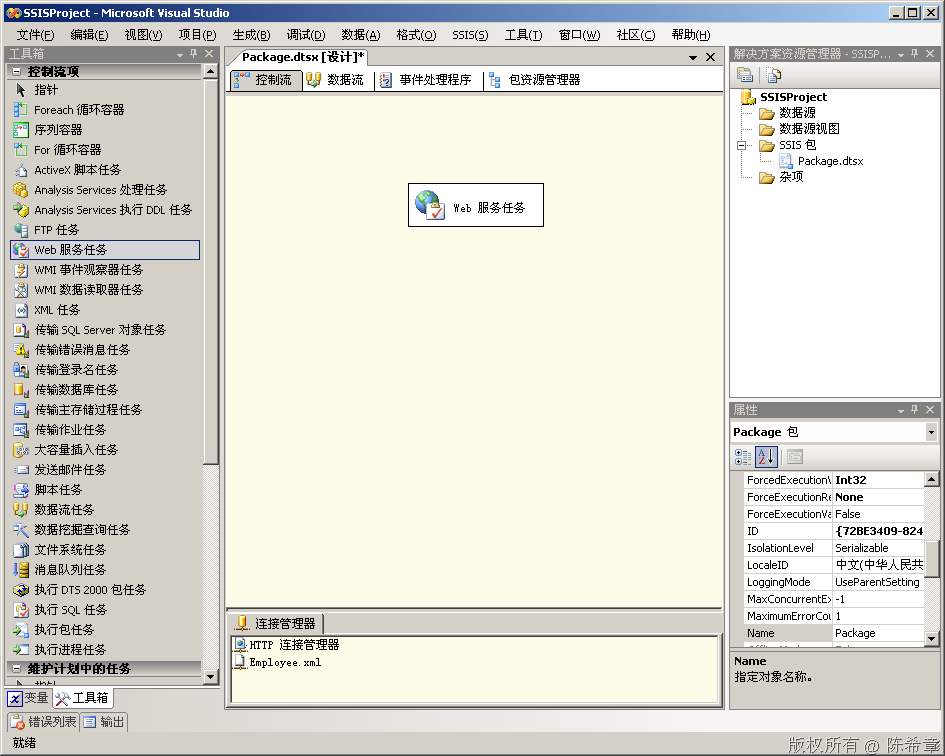
我们从工具箱中,拖拽一个”Web服务任务”到“控制流”的空白区域
image
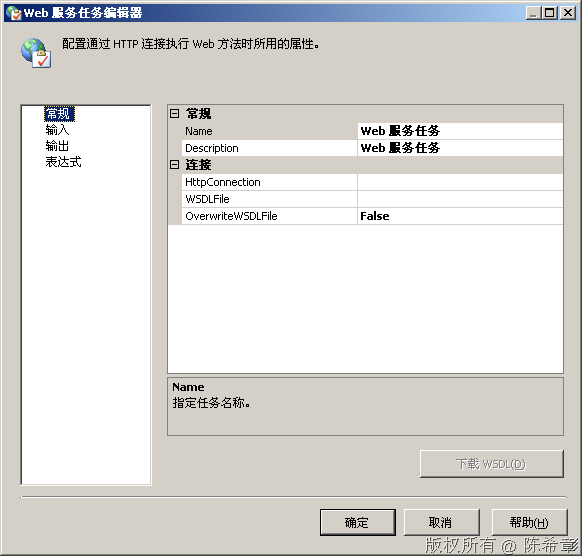
选中该任务,点击右键,“编辑”
image
点击”HttpConnection”右侧的下拉按钮,选择“新建连接”
image
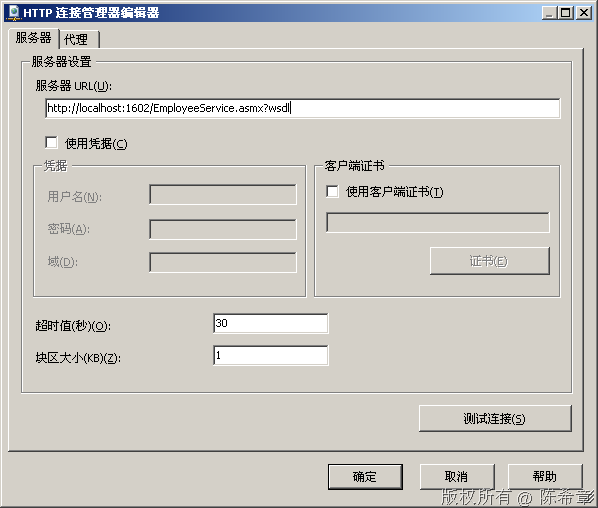
【注意】这里的服务器Url应该带有wsdl后缀,因为等一下可以利用这个路径生成一个本地的wsdl文件
我们这里没有使用凭据。需要说明一下的是,“Web服务任务”能够使用的凭据只有两种:匿名或者基本验证。
何时使用证书?如何我们的服务是用WSE做了安全控制的话。

点击“测试连接”,确保它是成功的
image
点击“确定”,“确定”退出连接管理器设置界面
image
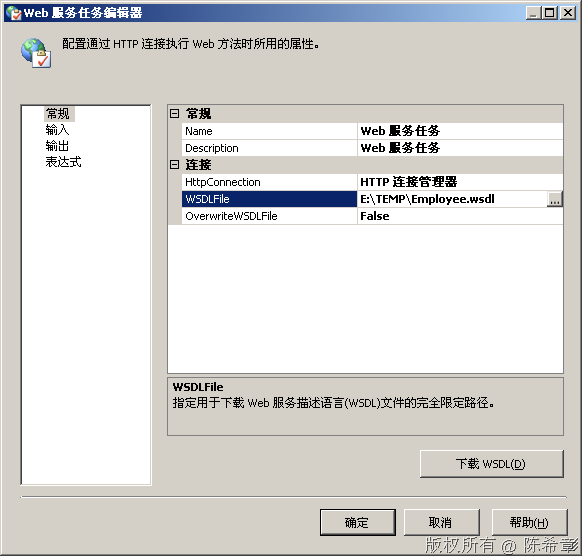
在“WSDLFile”这里面输入一个临时路径,例如:E:\TEMP\Employee.wsdl
image
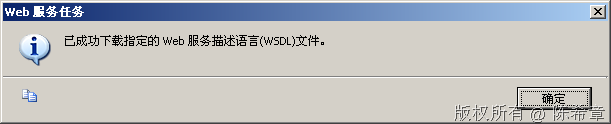
点击“下载WSDL”按钮, 如果不出意外的话,应该可以看到下面的提示
image
这个操作其实是产生了一个wsdl文件,我们可以打开来看一下
image
顾名思义,WSDL是对服务进行了描述。为什么需要描述呢?就是后续需要用到里面的信息进行设置。
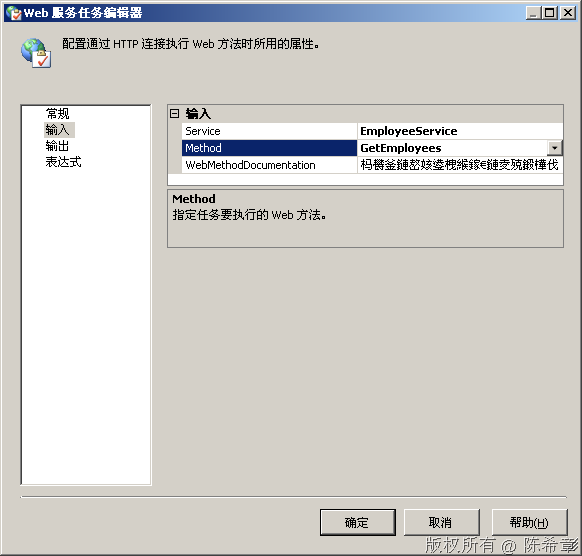
接下来,我们转到“输入”这个页面
image
依次在右侧选择Service和Method
image
【注意】第三行有些乱码,是因为对中文支持不好,可以不予理会
这样,我们就完成了输入设置,也就是可以连接到Web Service了。

3. 如何将获取到的数据进行保存或者处理呢?
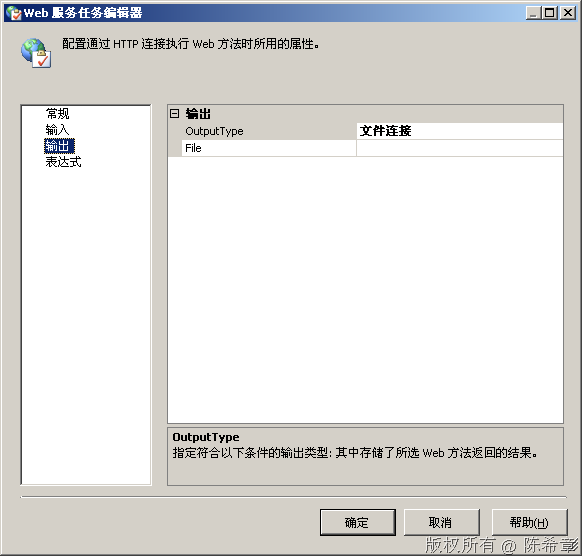
我们可以转到“输出”页面
image
它支持两种输出类型:文件连接或者变量
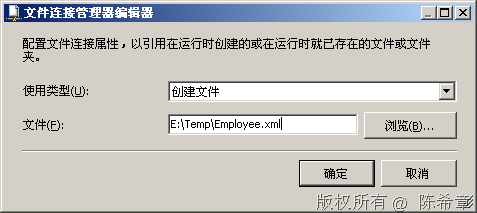
我们先用“文件连接”来接受输出,然后点击”File”右侧的小下拉箭头,点击“新建连接”
image
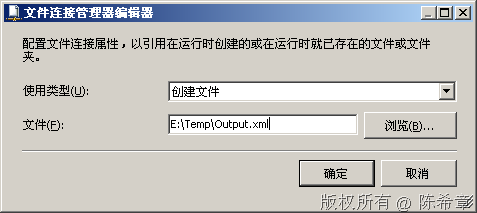
我们让它创建一个新的文件,保存在临时目录下。点击“确定”后即可完成该任务的配置

4. 测试任务运行。
image
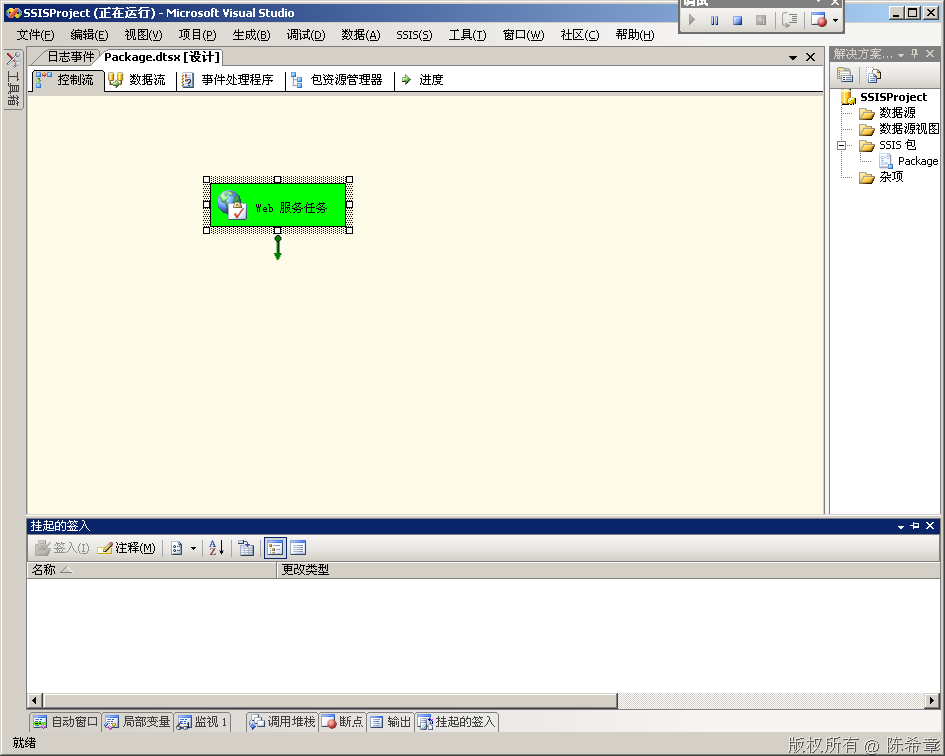
选中“Web服务任务”,点击右键,“执行任务”
image
如果不出意外的话,该任务能够成功执行。

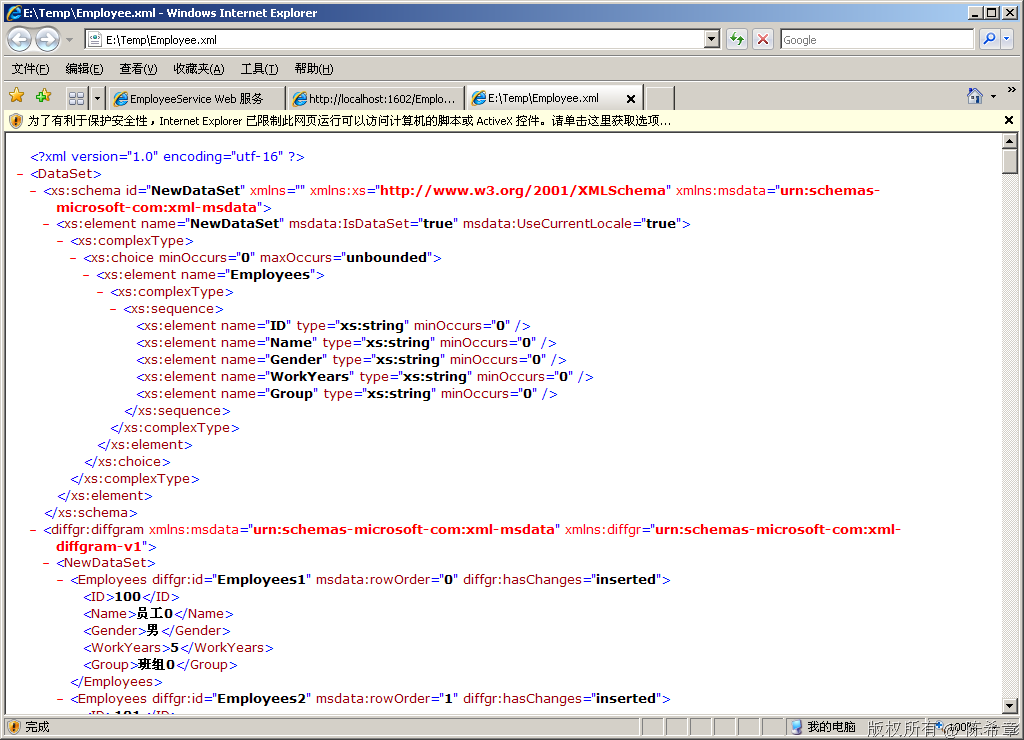
5. 查看结果。我们打开保存的那个文件,可以看到,这是一个标准的XML文件,证明我们已经把数据下载下来了。
image


结束语:我们现在已经通过“Web服务任务”成功地完成了服务的调用,并且将结果保存为一个本地文件。那么,怎么处理该文件,并将其数据上传到我们的数据仓库中去呢?
这个问题在下一篇讲解

上一篇,我们讲到了通过Web服务任务将异构系统中的数据保存为一个XML文件。它们看起来是这样
image
但问题在于,我们如何处理该XML文件,并将其提交到我们的数据库中去呢?我们这一篇文章会用到XML任务和XML源对其进行转换和加载
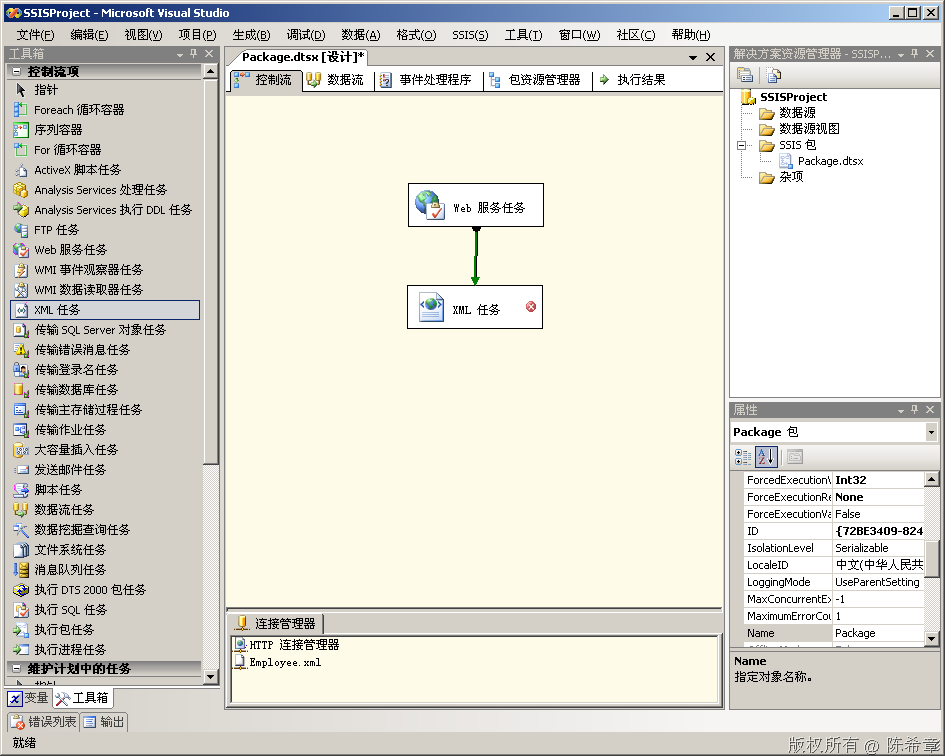
1. 首先,拖拽一个“XML任务”到控制流中,并且设置好它与“Web服务任务”的优先约束
image
2. 编辑该任务(右键=》“编辑”
image
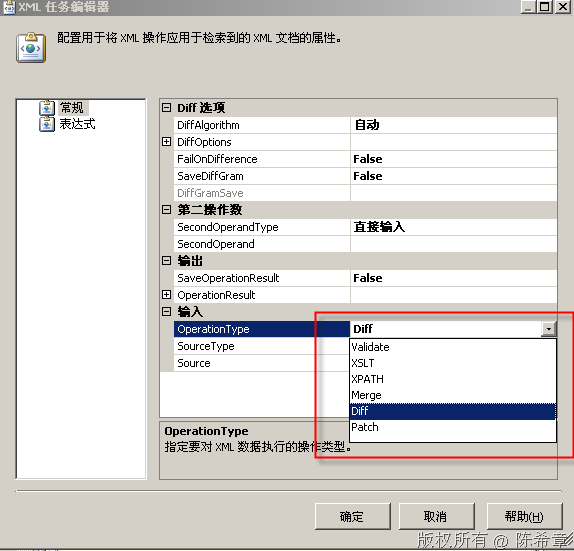
XML任务是很强大的,它可以做如下的事情
  • 验证文档
  • 比较文档
  • 合并文档
  • 转换文档
  • 查找数据或者运算
这五个操作分别就对应了几个不同的OperationType
image
我们这里选择XSLT,因为我们想对数据进行一些转换,现在下载下来的数据太复杂了:有命名空间,而且有很多没必要的元素。
image
在继续操作之前,我们需要准备一个XSLT文件。

3. 编写一个XSLT文件
image
<?xml version="1.0" encoding="utf-8"?>
<xsl:stylesheet version="1.0" xmlns:xsl="http://www.w3.org/1999/XSL/Transform"
    xmlns:msxsl="urn:schemas-microsoft-com:xslt" exclude-result-prefixes="msxsl" 
                xmlns:diffgr="urn:schemas-microsoft-com:xml-diffgram-v1"
><!--这里添加一个特殊的命名空间,因为来源XML文件中有这个名称-->
    <xsl:output method="xml" indent="yes"/><!--我们仍然输出为XML-->

    <xsl:template match="/DataSet/diffgr:diffgram/NewDataSet">
      <Employees><!--这是我们自定义输出文档里面的根元素-->
        <xsl:for-each select="Employees">
        <!--循环/DataSet/diffgr:diffgram/NewDataSet下面所有的Employees元素-->
          <Employee>
            <ID>
              <xsl:value-of select="ID"/>
            </ID>
            <Name>
              <xsl:value-of select="Name"/>
            </Name>
            <Gender>
              <xsl:value-of select="Gender"/>
            </Gender>
            <WorkYears>
              <xsl:value-of select="WorkYears"/>
            </WorkYears>
            <Group>
              <xsl:value-of select="Group"/>
            </Group>
          </Employee>
        </xsl:for-each>
      </Employees>
    </xsl:template>
</xsl:stylesheet>
将该文件保存到一个目录,例如E:\Temp目录
 
4. 使用该文件对Employee.XML进行转换。
我们回到SSIS包的设计器中。
image 
【注意】Source这里设置的是数据来源文件
 
将“SaveOperationResult”设置为true
展开“OperationResult”这个节点
 
设置Destination
image 
点击“确定”
在“第二操作数”处,选择“SecondOperatedType”为文件连接,并选择SecondOperand为“Employee.xslt”。其实就是我们的转换文件
image

点击“确定”

5. 调试该任务。选中它,右键,执行任务
image

6. 检查输出文件。我们可以去打开那个Output.xml。这个文件显然更加易于理解和处理了
image

结语:这一篇,我们通过XML任务对一个XML数据文件进行了转换。那么怎么把这个数据最终提交打数据库去呢?下一篇将介绍使用XML源来实现该需求

上一篇我们讲到了如何实现XML文档的转换。那么如何将这些规范的数据导入到数据库中去呢?本节我们讲解使用XML源来实现该需求
1. 添加数据流任务,并设置其与XML任务的优先约束
image
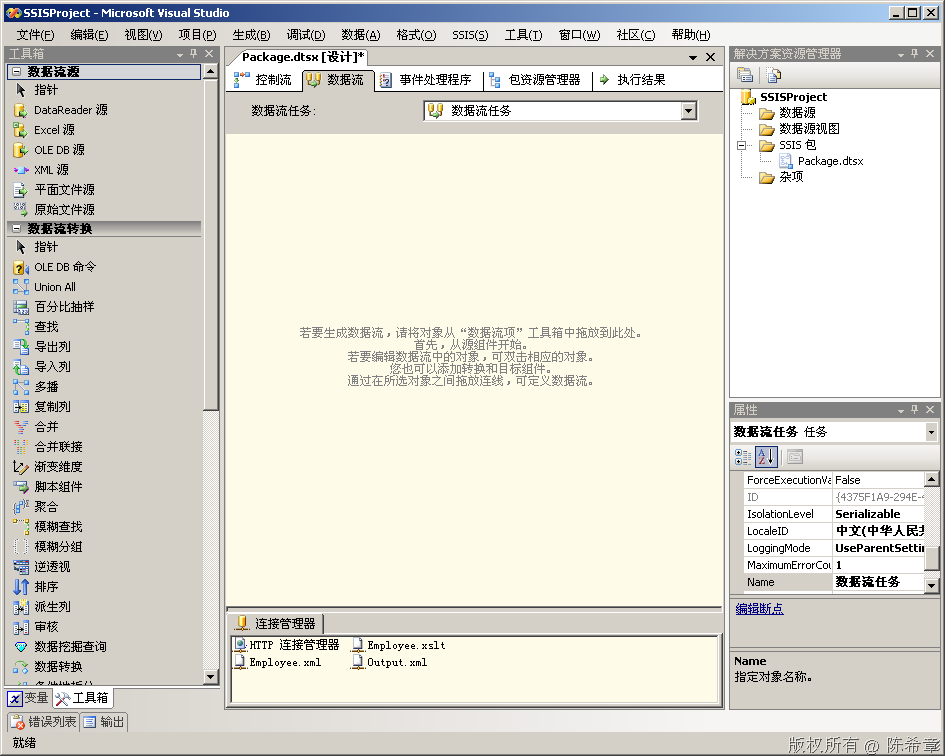
2. 编辑数据流任务
双击该任务
image
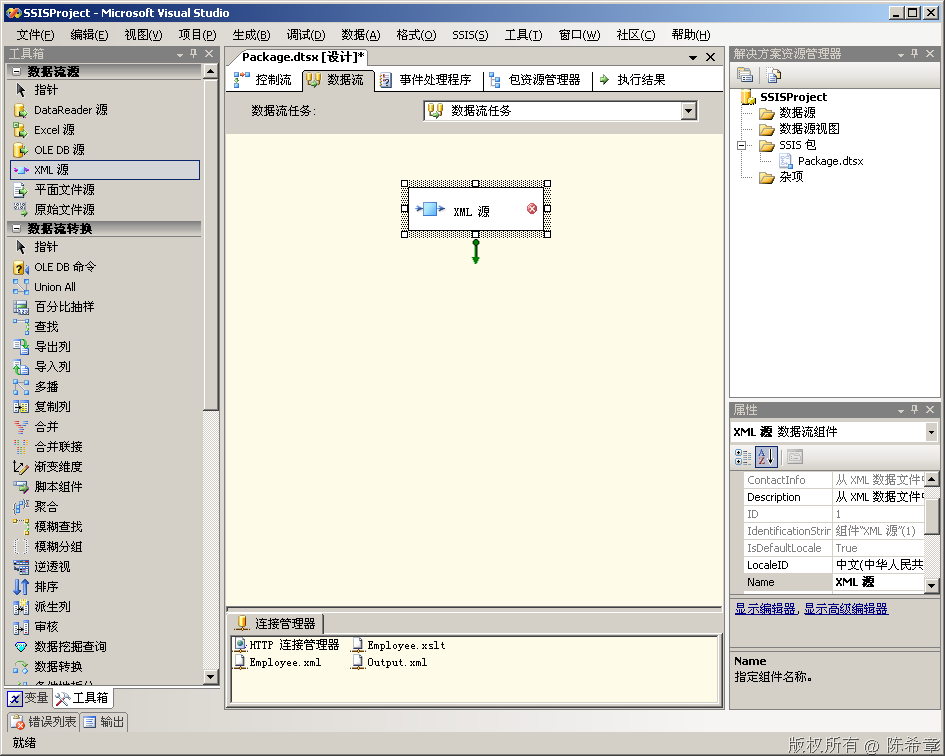
3. 添加XML源
image
4. 编辑该组件
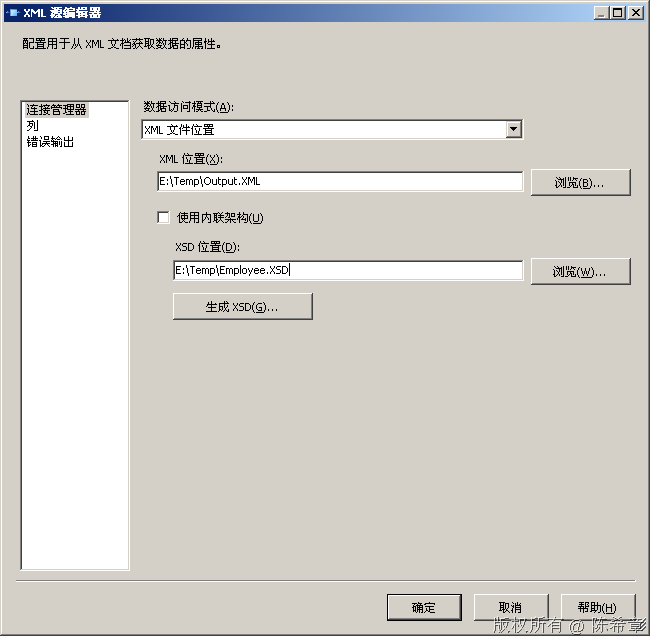
image
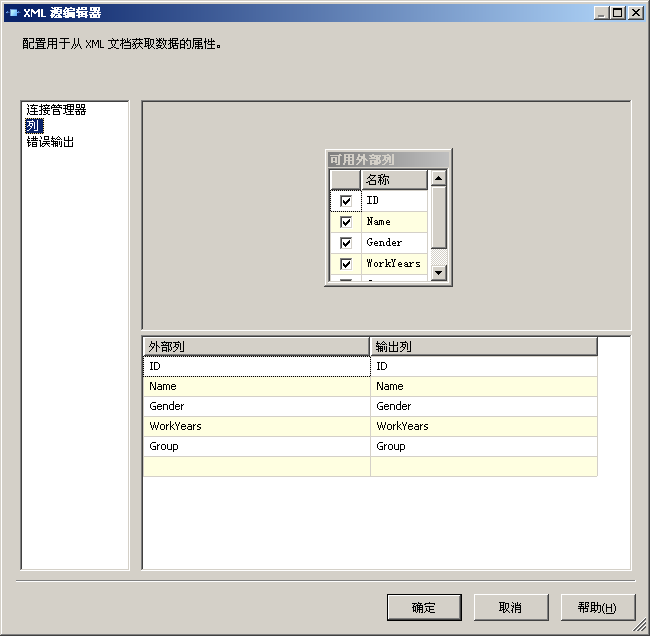
点击“生成XSD”。然后点击“列”
image
可以看到,它现在检测到了五个列。
到这里为止,我们就完成了XML源的设置

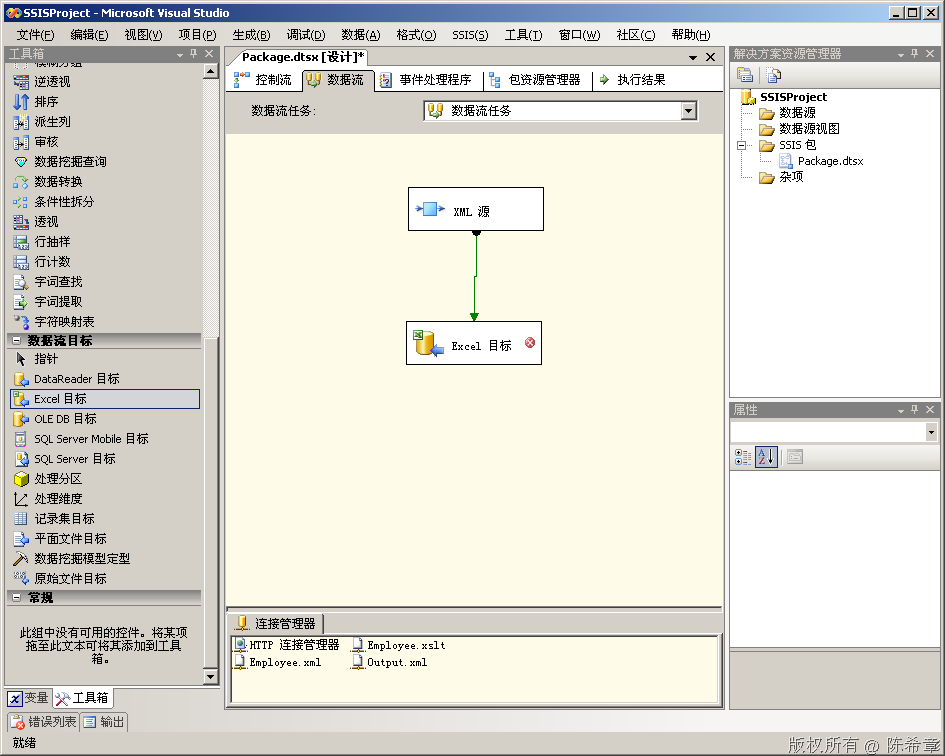
5. 添加数据目标
我们希望将这些数据传输到其他数据存储中去。作为演示目的,我们这里直接使用简单一点的Excel作为目标
image
编辑该目标
image
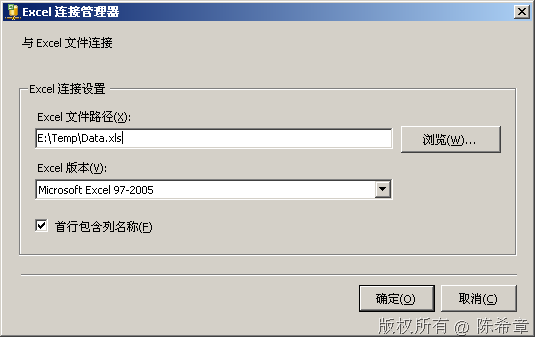
在“OLEDB连接管理器”这边点击“新建”
image
点击“确定”
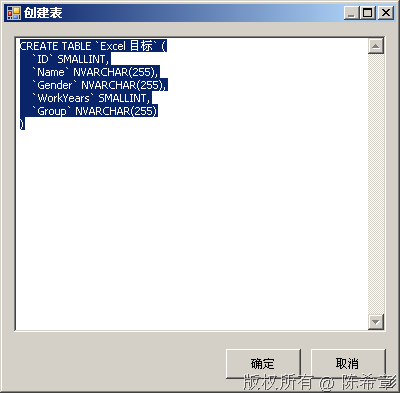
在”Excel工作表名称”这边点击“新建”
image
点击“确定”
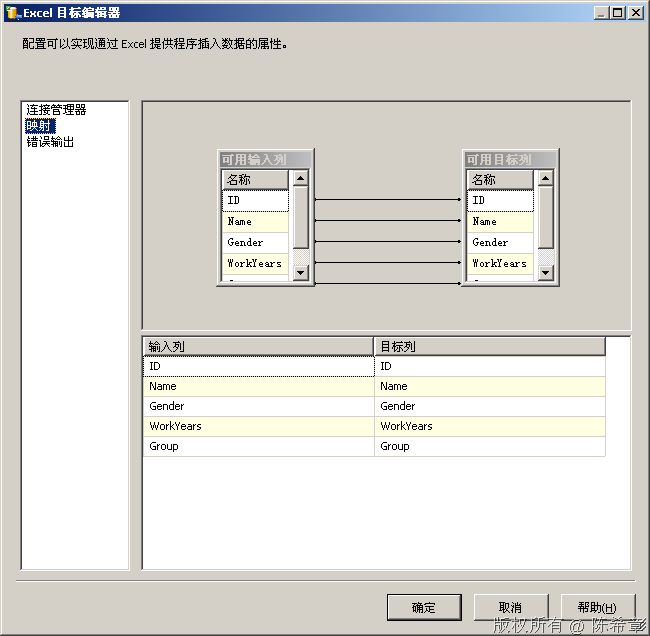
点击一下左侧的“映射”
image
然后点击“确定”

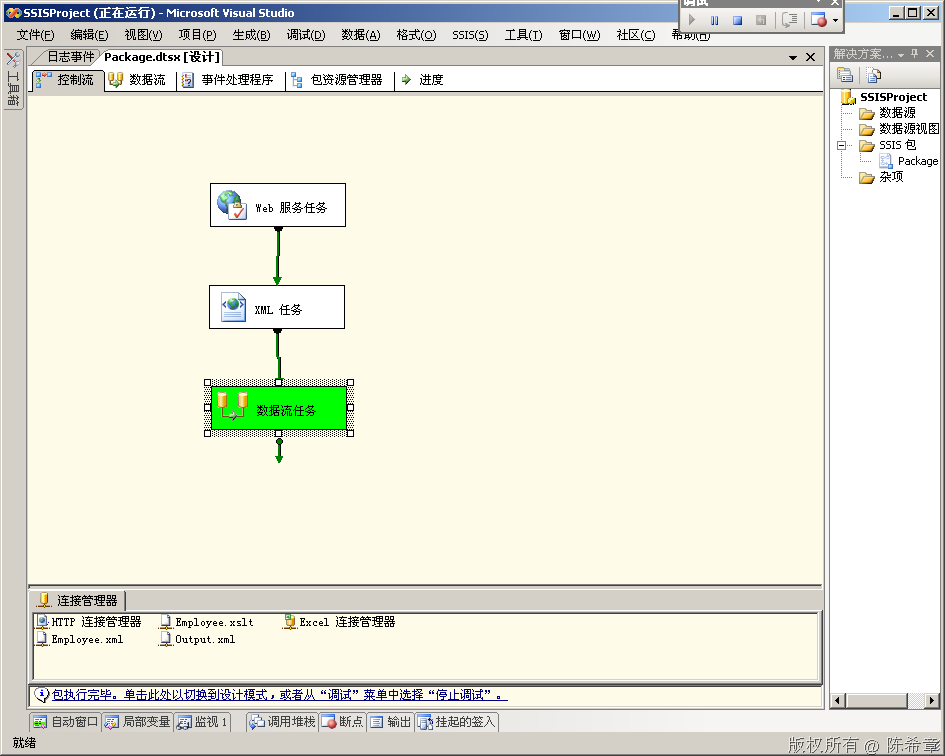
6. 测试数据流
我们回到“控制流”的界面,选中“数据流任务”,右键,“执行任务”
image

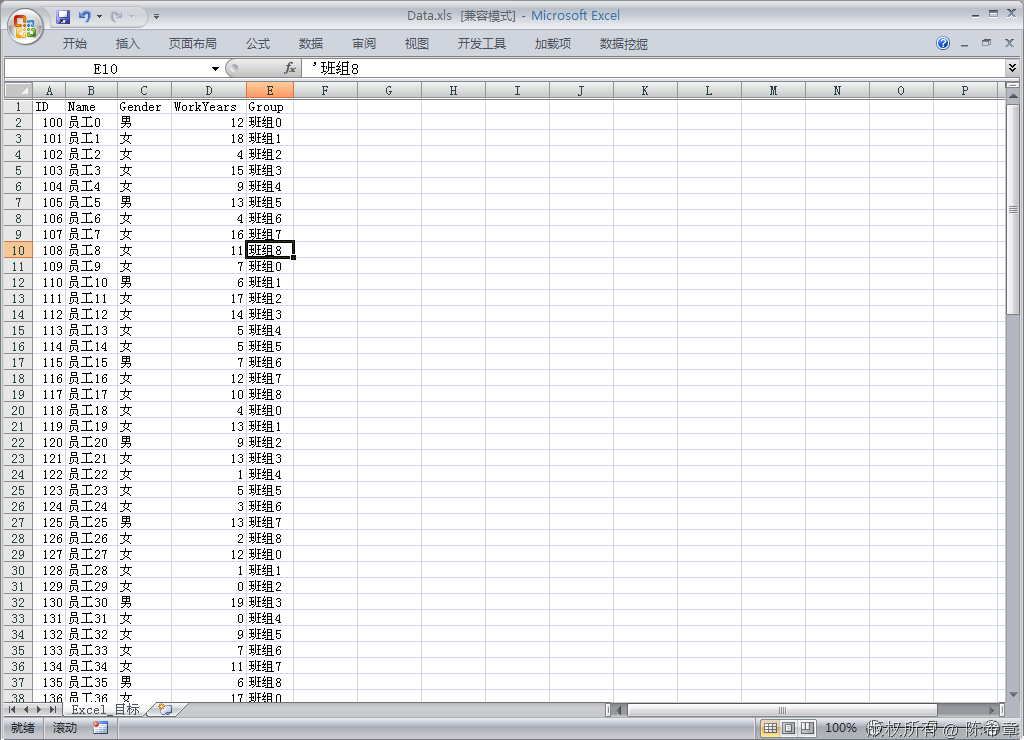
7. 查看结果。我们去打开那个 Data.xls
image
在这里,我们看到的是一条一条的记录。

2011年7月25日 星期一

How to use OUTPUT parameters with SSIS Execute SQL Task

Yesterday while trying to get OUTPUT parameters to work with SSIS Execute SQL Task I encountered a lot of problems, which I'm sure other people have experienced. BOL Help is very light on this subject, so consider this the lost page in help.
The problem comes about because different providers expect parameters to be declared in different ways. OLEDB expects parameters to be marked in the SQL statement with ? (a question mark) and use ordinal positions (0, 1, 2...) as the Parameter name. ADO.Net expects you to use the parameter name in both the SQL statement and the Parameters page.
In order to use OUTPUT parameters to return values, you must follow these steps while configuring the Execute SQL Task:

For OLEDB Connection Types:

  1. You must select the OLEDB connection type.
  2. The IsQueryStoredProcedure option will be greyed out.
  3. Use the syntax EXEC ? = dbo.StoredProcedureName ? OUTPUT, ? OUTPUT, ? OUTPUT, ? OUTPUT The first ? will give the return code. You can use the syntax EXEC dbo.StoredProcedureName ? OUTPUT, ? OUTPUT, ? OUTPUT, ? OUTPUT to not capture the return code.
  4. Ensure a compatible data type is selected for each Parameter in the Parameters page.
  5. Set your parameters Direction to Output.
  6. Set the Parameter Name to the parameter marker's ordinal position. That is the first ? maps to Parameter Name 0. The second ? maps to Parameter Name 1, etc.

For ADO.Net Connection Types:

  1. You must select the ADO.Net connection type.
  2. You must set IsQueryStoredProcedure to True.
  3. Put only the stored procedure's name in SQLStatement.
  4. Ensure the data type for each parameter in Parameter Mappings matches the data type you declared the variable as in your SSIS package.
  5. Set your parameters Direction to Output.
  6. Set the Parameter Name to the same name as the parameter is declared in stored procedure.
For other connection types, check out the table on this page


Note: if you choose the ADO/ADO.Net connection type, parameters will not have datatypes like LONG, ULONG, etc. The datatypes will change to Int32, etc. Make sure that the datatype is EXACTLY the same type as the Variable in your package is defined. If you choose a different datatype (bigger/smaller/different type) you will get the error:
Error: 0xC001F009 at Customers: The type of the value being assigned to variable "User::Result_CustomerID" differs from the current variable type. Variables may not change type during execution. Variable types are strict, except for variables of type Object.
Error: 0xC002F210 at Add New Customer, Execute SQL Task: Executing the query "dbo.AddCustomer" failed with the following error: "The type of the value being assigned to variable "User::Result_CustomerID" differs from the current variable type. Variables may not change type during execution. Variable types are strict, except for variables of type Object.
". Possible failure reasons: Problems with the query, "ResultSet" property not set correctly, parameters not set correctly, or connection not established correctly.
To fix this error make sure the datatype you select for each parameter in the Parameters page exactly matches the datatype for the variable.

If you have attempted to use a connection type other than ADO.Net with named parameters you will recieve this error:
Error: 0xC002F210 at Add New customer, Execute SQL Task: Executing the query "exec dbo.AddCustomer" failed with the following error: "Value does not fall within the expected range.". Possible failure reasons: Problems with the query, "ResultSet" property not set correctly, parameters not set correctly, or connection not established correctly.
Named parameters can only be used with the ADO.net connection type. Use ordinal position numbering in order to use OUTPUT parameters with the OLEDB connection type. Eg: 0, 1, 2, 3, etc.


OUTPUT parameters are extremely useful for returning small fragments of data from SQL Server, instead of having a recordset returned. You might use OUTPUT parameters when you want to load a value into a SSIS Package variable so that the value can be reused in many places. The data that is output might be used for configuring / controlling other Control Flow items, instead of being part of a data flow task.
If you were using output parameters in Management Studio, your SQL statement might look something like:
DECLARE @Name       nvarchar(125)
DECLARE @DOB        smalldatetime
DECLARE @CustomerID int
EXEC dbo.AddCustomer @CustomerName = @Name, @CustomerDOB = @DOB, @CustomerID = @CustomerID OUTPUT
PRINT @CustomerID

If you attempt to use the same syntax (highlighted above) with an Execute SQL Task you could end up with the error message:
Error: 0xC002F210 at Add New customer, Execute SQL Task: Executing the query "EXEC dbo.AddCustomer @CustomerName = @Name" failed with the following error: "Must declare the scalar variable "@Name".". Possible failure reasons: Problems with the query, "ResultSet" property not set correctly, parameters not set correctly, or connection not established correctly.


The only hint SQL Server 2005 Books Online gives is:
QueryIsStoredProcedure
Indicates whether the specified SQL statement to be run is a stored procedure. This property is read/write only if the task uses the ADO connection manager. Otherwise the property is read-only and its value is false.
(from SSIS Designer F1 Help > Task Properties UI Reference > Execute SQL Task Editor (General Page) )

There's a number of pages in Books Online that address Parameter use with the Execute SQL Task, but none adaquately address using output parameters. Articles which could do with updating:
  • How to: Map Query Parameters to Variables in an Execute SQL Task
  • Execute SQL Task Editor (Parameter Mapping Page)
  • Execute SQL Task Editor (General Page)
  • Execute SQL Task
  • Execute SQL Task (Integration Services)

2011年7月6日 星期三

[SQL][SQL Server]自動補足空白列數

這是在做Reporting Service報表時遇到的問題,每頁要顯示60筆資料
不足60筆的時候必須補足空白資料行,也就是說如果只有58筆資料,就必須印2行空白列
同理如果有110筆資料,第一頁印滿60筆後,第二頁只有50筆,就要在印10行空白列
在網路上找了很久,就是找不到我要的答案,只好自己東湊西湊,總算是湊出來了
方法是用UNION ALL連接多個空行,讓資料行數補足成為60的倍數,至於差幾行可以補滿60倍數是用餘除的方法
語法大致如下,以下語法適用SQL SERVER

-- 第一段是主要的查詢結果
SELECT field1, field2, field3 FROM table1 WHERE field4 = 'value'
UNION ALL
-- 這段跟主要查詢與法相同,只是變成查詢總列數,接著餘除每頁筆數,且查出來的是空白列
SELECT TOP((SELECT COUNT(*) FROM table1 WHERE field4 = 'value') % 60) 
NULL, NULL, NULL
FROM table2
 
這樣就算完成了,原理是從某個一定大於每頁筆數的資料表撈出要補足的資料列,當然欄位都設定成NULL
再使用UNION ALL把所有NULL資料列補上去,就算完成了

Reporting Service 如何讓資料表固定呈現五筆資料

需求詳述:
Reporting Service 要如何讓資料表固定呈現五筆資料?
即使資料不到五筆時,要塞入空白的資料,
以讓資料表呈現固定長度的表格。
解決說明:
針對資料不足五筆時的處理,步驟如下:
1. 先做出五筆空白記錄,其中 FLAG 是為了往後步驟的需要作準備。


2. 取得資料表的欄位名稱


3. 將步驟一及二,兩者 LEFT JOIN 後,再與原始資料表作 UNION ALL 結合,
並取得前五筆。

備註:本例是用WHERE 1=0 取得SCHEMA,並填入空白資料,再用TOP取固定筆數。